RDR2 Won't Launch on PC: What to Do When Steam or Rockstar Launcher Fails
If RDR2 will not launch, first identify where startup stops. Steam, Rockstar Games Launcher, drivers, permissions and game files can produce similar symptoms.
- Symptom
- RDR2 WON'T OPEN
- First step
- IDENTIFY FAILURE
- ERR_GFX_STATE
- TRY DX12
- Reinstall
- LAST
- Confirmed
- Unconfirmed
What these labels mean
- Confirmed
Confirmed means the information comes from its owner: the studio, publisher, manufacturer or platform (Rockstar, Take-Two, Sony, Elgato, YouTube…).
- Unconfirmed
Unconfirmed is everything else: media reports, leaks, estimates, community reconstructions and our own deductions. A rumor remains unconfirmed even when many outlets repeat it.
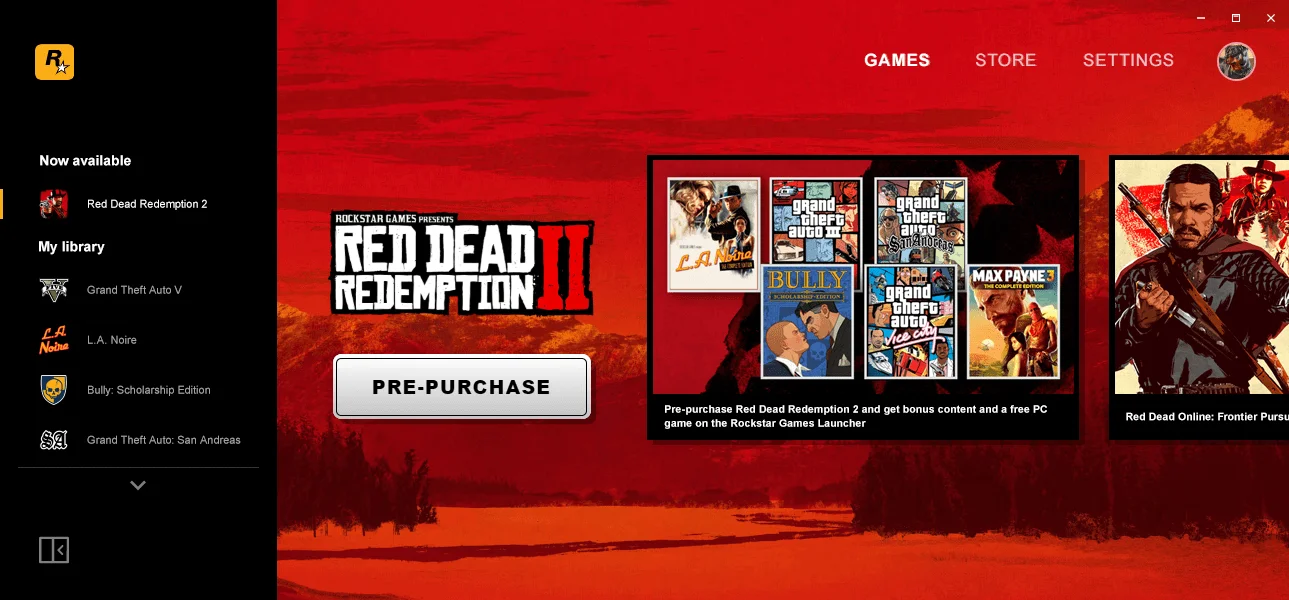
If RDR2 will not launch on PC, start by finding the point where startup stops. Steam can show Running even when RDR2.exe never appears, while a Rockstar Games Launcher failure needs a different path from ERR_GFX_STATE. A full reinstall should come after you identify the symptom.
Jump to: Identify the symptom · Rockstar Games Launcher · Steam says Running · ERR_GFX_STATE · Verify files · Logs
Quick answer: identify where startup fails → update the Launcher, game, Windows and GPU driver → verify files → use the fix for the exact error → reinstall the Launcher or RDR2 only after the less invasive steps fail.
| Symptom | Likely area | First step |
|---|---|---|
| Rockstar Games Launcher will not open | Launcher / installation | Restart and update Launcher |
| Launcher is black or keeps loading | Launcher / authentication / connection | Check Launcher and service status |
Steam says Running but RDR2.exe never appears | Pre-executable startup | Launcher + files + logs |
| RDR2 begins opening and closes | Drivers / graphics / permissions | Read the error and update drivers |
ERR_GFX_STATE | Graphics API / drivers | Drivers + try DirectX 12 |
ERR_GFX_INIT | Graphics initialization | Drivers + graphics configuration |
| Privileges error | Permissions | Apply the required privileges |
| Error 15 | Rockstar Games Launcher | Clean Launcher installation |
“Likely area” is a diagnostic starting point, not a confirmed cause.
First: identify exactly what happens
Before deleting files or downloading the entire game again, watch what the PC actually does after you press Play.
These symptoms are useful to separate:
- Steam switches from Play to Running, then back to Play.
- Steam stays on Running, but
RDR2.exenever appears. - Rockstar Games Launcher does not open.
- The Launcher opens to a black screen or keeps loading.
- RDR2 begins loading and then closes.
- A specific code appears, such as
ERR_GFX_STATE,ERR_GFX_INITor a privileges error.
The exact message and the stage where startup fails narrow the problem considerably. Rockstar maintains separate procedures for graphics errors, permissions, Launcher problems, file integrity and general crashes in its RDR2 PC troubleshooting documentation.
Daykyri says: what does it mean with the controller in your hands? Finding the failure point first lets you change one part of the system, test again and get back to the game without stacking fixes you may later need to undo.
Do these checks before changing settings
ConfirmedRockstar includes GPU drivers, Launcher updates and Windows updates among its general RDR2 PC troubleshooting steps. It also documents file verification and the Launcher local profile. Rockstar Games — RDR2 PC general troubleshooting
Use this order:
- Fully close Rockstar Games Launcher and reopen it so updates can install.
- Make sure RDR2 is current.
- Install the current graphics driver for your GPU.
- Check Windows Update.
- Verify the game files.
- If the symptom looks authentication- or connection-related, check Rockstar service status.
Do not change Vulkan, permissions, antivirus settings, folders and the installation all at once. If the game starts afterward, you will not know which change mattered.
Rockstar Games Launcher will not open or keeps loading
ConfirmedWhen the Launcher fails before RDR2 can execute, there is not yet enough evidence to blame the game itself.
Rockstar recommends fully closing and reopening the Launcher, allowing it to update and checking connectivity when the Launcher is the failing component. If you can open it, the general troubleshooting guide also includes removing the local profile as an available step. Rockstar Games — general troubleshooting
Does deleting the local profile delete my saves?
Rockstar says removing the Launcher local profile requires you to sign in again, but it does not delete your account or saved games. Use the specific local-profile function Rockstar documents rather than deleting broad folders by hand. Rockstar Games — general troubleshooting
Could OneDrive be involved?
One Steam case from August 2026 ended with the author connecting a Launcher failure to OneDrive after trying several other fixes. That is an individual community report, not a Rockstar instruction and not a reason to enable or disable OneDrive as a universal fix. Steam Community — Launcher and OneDrive case
Daykyri says: what does it mean with the controller in your hands? If the Launcher itself cannot get through startup, changing shadows, textures or resolution inside RDR2 is unlikely to reach the part that is failing.
Steam says “Running” but RDR2 never appears
UnconfirmedA January 2026 Steam report describes a specific pattern: Steam briefly showed Running, Rockstar Games Launcher appeared blank or black and RDR2.exe never started. The user had already verified files, reinstalled components and tried other changes without solving it. Steam Community — Running without RDR2.exe
That case does not identify one universal cause. It does show why Steam’s Running state should not be treated as proof that the game executable has successfully started.
How do I check whether RDR2.exe actually started?
Open Windows Task Manager while attempting to launch the game and look for RDR2.exe. If it never appears, the failure is happening before that executable gets running in that attempt. Launcher behavior, authentication, files and logs are then more useful places to investigate than in-game graphics settings.
Daykyri says: what does it mean with the controller in your hands? Steam can say Running while there is still no playable RDR2 process. That distinction can save you from tuning a game that has not reached startup yet.
RDR2 closes at startup or shows “Exited Unexpectedly”
ConfirmedRockstar has a specific support article for Red Dead Redemption 2 Exited Unexpectedly. It identifies outdated graphics drivers as a common cause and includes updating the driver, running RDR2.exe as administrator and disabling Fullscreen Optimization among the steps for this scenario. Rockstar Games — RDR2 Exited Unexpectedly
Does running as administrator fix every crash?
Rockstar includes it in the procedure for this specific problem, but that does not make “run everything as administrator” a universal PC fix. If you have a different error message, start with the procedure for that exact error.
ERR_GFX_STATE: what Rockstar recommends
ConfirmedFor ERR_GFX_STATE, Rockstar first recommends updating graphics drivers. Its official steps also include switching the graphics API from Vulkan to DirectX 12 and, if the problem continues, trying the administrator and Fullscreen Optimization steps. Rockstar Games — ERR_GFX_STATE
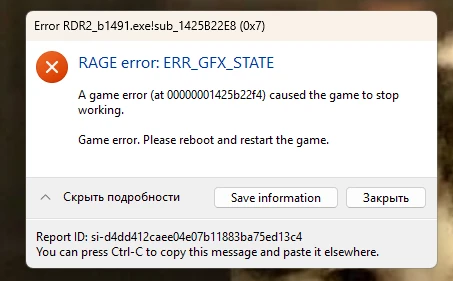
This is how ERR_GFX_STATE appears in Windows (screenshot from a Russian-language system). Rockstar Games error window.
A March 2026 Steam user also reported that switching from Vulkan to DirectX 12 allowed a newly installed copy of RDR2 to launch. That individual report matches an official Rockstar step; it does not tell us how often the fix works. Steam Community — Vulkan to DirectX 12
Should I always use DirectX 12?
Rockstar does not recommend replacing Vulkan with DirectX 12 on every PC. The switch appears in its specific ERR_GFX_STATE procedure. If RDR2 already works correctly with Vulkan, this error guide is not a reason to change API.
Daykyri says: what does it mean with the controller in your hands? If you have the exact ERR_GFX_STATE message, testing DX12 has official support behind it. Without that error, changing APIs gives you another variable before you know whether graphics initialization is the problem.
ERR_GFX_INIT is a different error
ConfirmedRockstar maintains a separate guide for ERR_GFX_INIT. Its procedure includes updating drivers, resetting graphics files or configuration and changing relevant Advanced Graphics settings where applicable. Rockstar Games — ERR_GFX_INIT
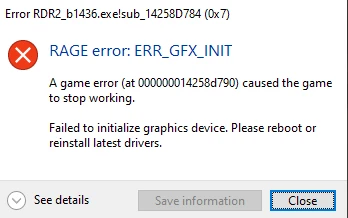
ERR_GFX_INIT adds “Failed to initialize graphics device.” Rockstar Games error window.
Can I just follow the ERR_GFX_STATE steps?
Do not treat the two codes as interchangeable. Rockstar has separate support procedures for ERR_GFX_STATE and ERR_GFX_INIT, so copy the exact error from the screen and follow the matching guide first. Rockstar Games — ERR_GFX_INIT
“Unable to launch RDR2.exe due to lack of privileges”
ConfirmedWhen the exact message says “Unable to launch RDR2.exe due to lack of privileges on the game library directory,” Rockstar connects the error to the privileges being used by RDR2 or Rockstar Games Launcher. Its support article explains how to run the required components as administrator. Rockstar Games — lack of privileges
Should I always run RDR2 as administrator?
There is no need to make it a blanket fix for every launch failure. Rockstar documents the change for the privileges error and includes it in some specific crash procedures. If your message does not concern permissions, identify the actual error first.
Verify the game files before reinstalling
ConfirmedRockstar documents file verification because it can identify missing, corrupted or outdated files without forcing you to download the entire game again. Rockstar Games — verify game files
In Rockstar Games Launcher:
- Open Settings.
- Go to My installed games.
- Select Red Dead Redemption 2.
- Run Verify Integrity.
If you own the Steam version, use Steam’s Verify integrity of game files function.
Is verifying files the same as reinstalling?
No. Verification checks and repairs the existing installation; reinstalling removes and installs the game again. That is why verification belongs much earlier in the troubleshooting order. Rockstar Games — verify game files
Daykyri says: what does it mean with the controller in your hands? Verification can save a full download and keeps the diagnosis simple: repair the installation before replacing the installation.
When to reinstall Rockstar Games Launcher
ConfirmedA clean Launcher reinstall makes more sense when the symptoms are concentrated in the Launcher itself: it will not open, initialization fails or Rockstar specifically prescribes a clean installation for the error.
Error Code 15 is a clear example. Rockstar’s official procedure includes performing a clean installation of Rockstar Games Launcher. Rockstar Games — Error Code 15
Should I manually delete Rockstar folders?
If you reach a clean-install step, follow the exact paths and procedure in Rockstar’s current support article. Do not wipe broad Documents folders because an old forum post says to “delete everything”; those locations can contain data you want to keep.
When should you reinstall RDR2 itself?
ConfirmedRockstar also documents a clean install of Red Dead Redemption 2. Its procedure includes backing up Story Mode saves before uninstalling, removing the specified components and reinstalling the game. Rockstar Games — clean install of RDR2
This should not be the first thing you do when you have not yet verified files or established whether the failure is inside RDR2 or in Rockstar Games Launcher.
When would I go this far?
After identifying the symptom, updating the basic components, verifying game files and using the procedure for the exact error. If the full installation still looks suspect, follow Rockstar’s clean-install instructions and back up the saves the support article tells you to protect.
Daykyri says: what does it mean with the controller in your hands? A complete reinstall costs time and bandwidth. It becomes reasonable after smaller checks have failed, not every time the game refuses to open once.
Antivirus, firewall and Windows Security
ConfirmedRockstar includes antivirus and Windows Security interference among its general PC troubleshooting considerations, which calls for a specific test while keeping protection on the rest of the time. Rockstar Games — general troubleshooting
If you perform a temporary test because the symptom points toward security software, turn protection back on afterward. For some communication errors, Rockstar documents creating exceptions rather than permanently disabling security. Rockstar Games — Error Code 1005
Should I turn off antivirus to play RDR2?
Rockstar may include a temporary test during troubleshooting, but that is different from using an unprotected PC as the permanent RDR2 setup. If a specific exception solves a communication issue, apply the required exception and restore normal protection.
Check the logs before trying random fixes
ConfirmedWhen ordinary troubleshooting does not explain the failure, Rockstar asks for several Windows diagnostic files:
DXDiag;MSInfo;launcher.log;prelauncher.logwhen Rockstar Games Launcher itself will not start.
Rockstar normally places launcher.log at:
Documents\Rockstar Games\Launcher\launcher.log
These files are documented specifically for PC troubleshooting and support. Rockstar Games — Windows troubleshooting files
Do I need to understand every log line?
No. The immediate value is knowing which files to preserve and provide if you need to contact Rockstar Support. Save the exact on-screen error too; “it won’t open” carries far less diagnostic information than ERR_GFX_STATE or a specific Launcher code.
What we would not change blindly
Launch problems get messy when official fixes, community workarounds and one-person anecdotes are treated as equal evidence.
| Action | Evidence | How we would use it |
|---|---|---|
Vulkan → DX12 for ERR_GFX_STATE | Rockstar + recent user case | Valid for that error |
| Administrator for privileges error | Rockstar | Valid for that message |
| Verify game files | Rockstar | Early, low-impact step |
| OneDrive changes | One Steam case | Clue, not general advice |
| Closing GPU Tweak III | Community case | Only if your setup points there |
| Permanently disabling antivirus | Not the recommended procedure | No |
| Deleting broad folders without a procedure | Unscoped | No |
One active Steam thread illustrates why a single universal recipe is unreliable: different users attribute similar launch symptoms to different causes, including one report involving GPU Tweak III. Steam Community — different launch-failure causes
There’s no need to touch twenty settings: identify the symptom, check the evidence and make one relevant change.
What we know and what we do not
Rockstar provides official procedures for several specific problems: ERR_GFX_STATE, ERR_GFX_INIT, privileges errors, Exited Unexpectedly, Error 15, file verification and clean installation.
Recent Steam discussions also show black Launcher windows, Steam reporting Running without RDR2.exe and individual workarounds that solve one person’s machine. Those reports can point toward possible areas to inspect, but they do not establish a universal cause.
The sources reviewed offer no single official fix for the broad phrase “RDR2 won’t launch,” so the exact symptom still matters most.
Frequently asked questions
Why won’t RDR2 launch even though Steam says it is running?
Steam can begin the overall launch process without RDR2.exe successfully starting. A recent community case shows Rockstar Games Launcher loading or going black while Steam reports Running. Steam Community
Should I use Vulkan or DirectX 12?
There is no universal answer. For ERR_GFX_STATE, Rockstar includes switching from Vulkan to DirectX 12 among its official troubleshooting steps. Rockstar Games
Can reinstalling RDR2 fix a launch problem?
It can correct some installation problems, but it should usually come after file verification and checking whether Rockstar Games Launcher is the part that is failing. Rockstar publishes a separate clean-install procedure. Rockstar Games
Can I delete my Rockstar local profile?
Yes, using Rockstar’s documented procedure. Rockstar says you will need to sign in again, but your account and saved games are not deleted. Rockstar Games
What should I collect if nothing works?
Save the exact error and collect DXDiag, MSInfo, launcher.log and, when the Launcher itself does not start, prelauncher.log before contacting Rockstar Support. Rockstar Games
More Red Dead Redemption 2
RDR2 on Steam Deck: best settings for OLED and LCD
RDR2 at 60 FPS on PS5 and PS5 Pro: current status
enRAGE for RDR2: how to install the Nemesis mod
All Red Dead Redemption 2 guides
Sources
Rockstar Games — RDR2 on PC General Troubleshooting
Rockstar Games — ERR_GFX_STATE
Rockstar Games — RDR2 Exited Unexpectedly
Rockstar Games — RDR2.exe lack of privileges
Rockstar Games — verify game files
Rockstar Games — Error Code 15
Rockstar Games — clean install of RDR2
Rockstar Games — Windows troubleshooting files
Rockstar Games — Error Code 1005
Steam Community — Launcher and OneDrive case, August 2026
Steam Community — Vulkan to DirectX 12 case, March 2026
Steam Community — Steam Running without RDR2.exe, January 2026
Steam Community — crashes and ERR_GFX_STATE
Steam Community — different launch-failure causes
Last verified: October 8, 2026.